Text + Image = Tagxedo: The Next Generation of Word Cloud Fun

I’ve been a Wordle addict for a while. The online tool takes any text and creates a cloud of the words based on their frequency. It makes for some fun analysis activities that goes beyond the norm in the classroom.

When Obama was sworn in, Wordle addicts like me used the tool to analyze the inaugural address and to look back at the speeches of previous presidents. I even used Wordle to explore Elizabeth Alexander’s inaugural poem.

Shakespeare's Sonnet 18Now this word cloud-driven analysis is ready to move to the next level with Tagxedo. Highlighted Friday as Jane‘s Pick of the Day, Tagxedo shapes your cloud of words into an image. To demonstrate, I used the text of Shakespeare’s Sonnet 18 and had Tagxedo arrange the words into a heart. Cute, no?

Tagxedo allows you to choose one of 42 included image shapes or upload your own image. Settings allow you to customize the colors, contrast, and other features of the resulting word cloud.

You an also exclude words, and customize the way that the text is handled (e.g., include or exclude numbers or punctuation). Like Wordle, Tagxedo allows you to save the resulting word clouds. You can place the image in the Tagxedo Gallery, create an embedded version you can use elsewhere, or simply save the image as a JPG or PNG.

The possible downside: The tool uses Microsoft’s Silverlight. I didn’t have Silverlight installed, and it managed to crash my machine once the installation completed and I tried to refresh the Tagxedo page. If you allow for that possible bump and can get Silverlight installed, however, you’ll have another option for playing with word clouds in the classroom.
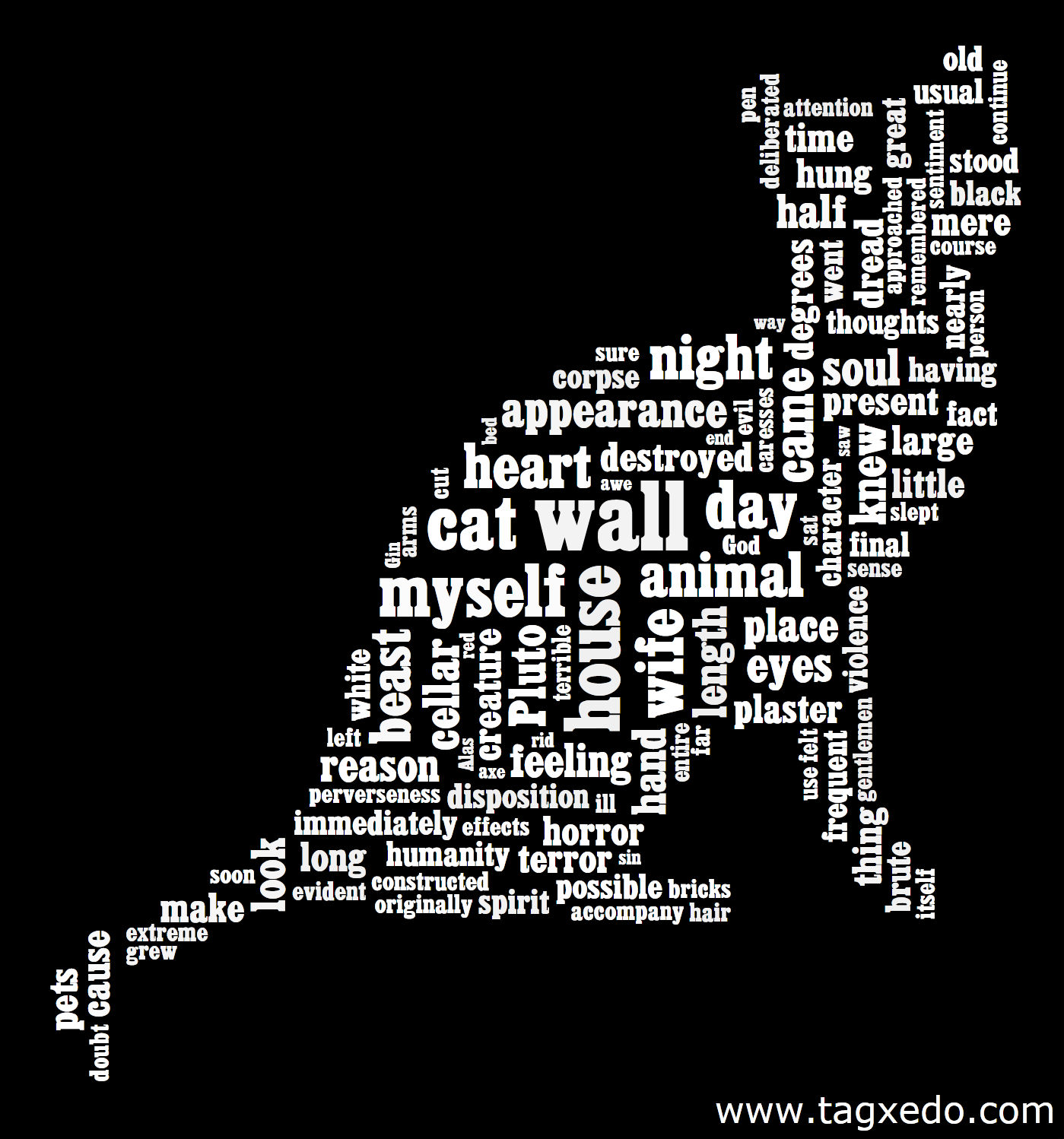
The Black Cat by Edgar Allan PoeThe benefit of Tagxedo in the classroom is its stronger connection to visual rhetoric. Word clouds emphasize the words that are used most frequently in a text. Taken out of their context, key words stand out and readers can think about how they may work as symbols, establish a mood, or build an image.

Tagxedo word clouds allow students to pair that kind of textual analysis with an image that extends the emphasis the words communicate. Consider the image on the left. I took the text of Edgar Allan Poe’s “The Black Cat.” Click on the cat image to see a larger version. If you have Silverlight installed, you can go to the Tagxedo site to see the Silverlight version, which enlarges the words in the image when you mouse over them.

To make the image, I had Tagxedo focus on the top 150 words. I chose the cat shape, which is one of Tagxedo’s included images, and then I changed the colors to get the strong contrast I wanted. I love the way this cat image includes the words cat, wall, myself, and animal in the center of the image, and the stark black and white contrast makes the cat image really stand out.

Now imagine students applying this same tool to texts you explore in class. The process is fairly simple:

  1. Choose a text. You might have students analyze a full chapter of a work, a short story, several poems by a single poet, or an essay. The text might come from an author in their textbooks or it could be their own work. Project Gutenberg can make the process for many out of copyright text as simple as copy and paste.
    The Tagxedo developers also have the ability to point to an HTML page and are working on the capability to use a Twitter feed or search results.
  2. Choose an image. There are 42 images included in Tagxedo. Students can also use their own images. Designs with a clear two-color appearance will work best. Simpler designs probably work best. A detailed image of a colorful garden is not going to work as well picture of a single flower.
  3. Enter the information in Tagxedo. Use the various tools in the left panel to customize the results. Make sure students know how to save the image so that they can share it with the class or turn it in.

Simple and fun, Tagxedo takes word clouds beyond simple rectangles and asks students to do a bit more critical thinking than Wordle word clouds do. There’s still a place for Wordle in the classroom, but Tagxedo adds another level to the designs that deepen students’ critical thinking–and can create some nice posters for the class bulletin boards and websites!


Piecing Together the Copyright Puzzle

Copyright Symbol by Horia VarlanFiguring out copyright can be like piecing together a puzzle. You have a good idea how it’s supposed to work in the end, but all the little pieces can be confusing to piece together.

I’ve posted links to 15 sites on copyright and fair use that will help you move from scattered pieces to a full picture in this week’s NCTE Inbox Blog.

[Creative Commons licensed Flickr photo of copyright symbol by Horia Varlan]

Still Trying to Move to Virginia

UHaul Trucks photo by rolandUsually I stick to the pedagogical writing and educational news here, but I’m going to spend a few minutes on personal things today.

As some of you may know, I left my job at NCTE back in November 2008 to help my mother with the day-to-day things. She’s well, nothing wrong with her. It’s just that she doesn’t go up and down the stairs as easily as she used to, and the household to-do’s were getting to be too much. She needed help, and so I stepped in.

Of course, moving seems easier in theory than it actually turns out to be. The little move from Illinois to Virginia still hasn’t quite been finished, but I’m much closer. We spent the last full week of May packing boxes in Illinois, and I’m leaving tomorrow morning to go finish up that task. My brother and some other folks arrive late Tuesday, and they plan to load the U-Haul Wednesday.

Cat in the box photo by There are still a lot of questions and curiousities. Do I really need all these books? What’s the point of all these papers in all these file folders? Do I have enough boxes?

Will there be a wicked, scary creature on the side of the U-Haul truck? Is there a U-Haul big enough for this many boxes of books and papers?

Will I open a box and find that I packed the cat? Wait, when did I get a cat? I don’t have a cat.

I don’t have many answers, but I know next week at this time, most of my belongings should be in Virginia.

In the meantime, the news stories and blog posts will fall silent again. Look for me to return on Flag Day, and if you wonder how the move is progressing, check my the updates on @tengrrl (public) or Facebook (login required).

[Creative Commons licensed Flickr photo of U-Haul Trucks by roland ]
[Creative Commons licensed Flickr photo of cat by mava ]

What’s the Trick to Building Community in the Classroom?

Barn raising photo by Mangrove MikeOnline or off, getting students to talk to each other is a tricky task. I’ve had my happy share of classes where discussion took off, but I’ve also had my quota of classes where not even bribery with cookies and candy could get students chatting.

The FeverBee Primer About Successful Online Communities can help. While meant more for corporate and public community building, the lessons apply to the classroom just as well.

Lesson One: Establish a reason to connect

FeverBee Blogger Richard Millington explains that the key to a successful community is “connecting a group of people online and making them feel a part of something special.” Students aren’t going to launch into discussion just because we throw them together. We have to give them reasons to connect.

Themed classes (e.g., classes focused on a specific topic like “rhetoric of war” or “gender images”) can have a real advantage here. Students are already in the classroom because of their shared interest, so you’re one step closer to community.

In other classes, you have to work a little harder. Try tying current events on your campus or in the news to the pedagogical goals of the course to make connections and give students a reason to start talking.

For instance, almost everyone has an opinion on the Mac vs. Windows vs. Linux debate. Share the Fast Company article, “Analyzing Steve Jobs’ Language at D8: He’s a "People" Person!” to tie discussion of personal opinions to rhetorical analysis.

Lesson Two: Focus on group bonding

With so much we need to accomplish in the classroom, group bonding may seem off-task. Millington’s advice is important here:

The better you get to know and like your fellow members, and the more you care about their opinion of you, the more you participate and thus work towards a successful goal.

Give students time to bond and make connections. Even simple icebreakers can help students get to know each other and ultimately increase participation.

Lesson Three: Do things together

You have gathered your students and they have some common interests, but that still may not be enough to build a thriving community. Millington explains:

Bonding a community means doing things together. Like challenges for your community, milestones to reach or problems to overcome. It also means having a high level of interactions per member and ensuring members are happy to disclose their thoughts, feelings and other information.

Simply put, the class needs to do things together. You don’t have to layer on another set of tasks to make this happen. Look at what students are doing and try strategies like these:

  • Recognize students with the most posts (just simply by the number).
  • Identify students whose questions lead to the most follow-up discussion.
  • Point out posts with great ideas that may have been overlooked.
  • Mark group milestones (like reaching 1000 posts as a class).

As Millington mentions, community challenges can also be effective. As a simple challenge, you might ask students to reach a certain number of posts on a specific topic. If students work in small groups, challenge groups to have each member participate five times, for example.

Consider community participation projects as well. You might challenge students to post photos of language use from the local area (e.g., misspellings, grammar errors, ironic images). Start class collections of great resources, like links to websites that relate to the class focus. If your technology resources allow, you can even add some simple voting for the favorite photos or links.

Lesson Four: Encourage authentic discussion

To ensure things move in the right direction, do all you can to encourage authentic conversation. Allow students to discuss topics freely and without fear of criticism.

Free discussion doesn’t mean anything goes however. Millington suggests that

Allowing self-disclosure also means accepting negative comments. Not personal attacks, they’re nearly always worth removing (as our [sic] racist, bigoted and sexist remarks) . . . .. [Allow] heated debates and open disagreement to take place. It’s tough to let this happen, it feels like you should jump in and break it up. But don’t. Let people get their opinions out into the open.

Be sure the boundaries for safe and appropriate discussion are clear. Talk about the ad hominem fallacy, and explain how it applies to class discussion. Work together to create some class guidelines to help things run smoothly if you like.

Looking for more?

You’ll find some more suggestions in the FeverBee Primer. For some additional ways to highlight class members, check out 10 Excellent Rewards You Can Offer Members That Don’t Cost A Penny.


[Creative Commons licensed Flickr photo by Mangrove Mike]

Even More Literary Ten Bests

Ten Bells, Spitalfields, E1Can you name ten memorable vegetables from the literature you’ve read? How about ten pieces of literature that include a shipwreck or perhaps a volcano? You’ll find lists for these and much more below.

When I went searching for the literary lists of “Ten Best” from the UK newspaper The Guardian, I somehow missed dozens of interesting collections. These links will take you to ten of the best:

Always be sure to check for newest additions to the list on the Guardian site. You may find a new list that’s perfect for the texts you’ve been reading in class

Obviously there are more lists there than you’ll need for any one class, and some of the lists may be inappropriate for your students. There’s enough range though that you’re bound to find something useful whether you want to model a year-end activity with the literary lists of ten or try something else.


[Creative Commons licensed Flickr photo by Ewan-M]

Fun and Painless Summer Learning

Giraffe Photo by Jon OvingtonUnsure how to help families sneak in summer learning without the kids staging a revolt? Encourage families to tie educational projects to the things they’re already doing and the events they’re already talking about. Whether it’s a trip to the zoo, the pool, or the museum, there are resources out there that families can use to connect family activities to summer learning.

I explain how to make summer learning fun and painless in this week’s NCTE Inbox Blog.

[Creative Commons licensed Flickr photo by Jon Ovington]